Compatibility
Minecraft: Java Edition
Platforms
Supported environments

Details

Join the discord to view progress on 1.0.0, a FULL revamp :D


Transforms your survival Minecraft experience into a recreation of the hit game 'Raft' This datapack comes with an overhauled experience, with new mechanics, new blocks and structures, and even new mobs!
Since this is a Datapack and Resource pack, both can be installed once server side and will apply to all players that join, voiding the need for each player to install the pack!


Building
- Decorate to your hearts content!
- You can place various large structures such as foundations, smelteries, collection nets and more with a grid-like building style!
- You can tear down structures with your builders hammer!
Flotsam
- Scoop up various types of junk too craft with!
- Flotsam spawns around the raft and can be fished up with a fishing rod
Steve the Shark
- Chomp Chomp
- Steve is a friendly lil' fellow!
- He circles your raft and occasionly scoots in to take a snack off it
Custom Features
Building & Construction
- Grid-based raft expansion system
- Multi-level construction with wooden platforms, stairs, support beams
- Foundation armor for shark protection
- Hammer tool for dismantling raft components
- Walls (regular and L-junction variants)
- Carpentry table and carpentry kit system
Resource Collection & Processing
- Collection nets with 15-item capacity and warning particles
- Ocean debris spawning system
- Smeltery for refining scrap materials
- Recycler for converting junk into trash cubes
- Water purifier for ocean water conversion
- Rain collector with weather-based filling
Survival Systems
- Hydration management system
- Dynamic weather system affecting gameplay
- Storm effects on shark behavior and rain collection
- Custom recipe unlock progression
Farming & Food
- Crop plots for growing thatch, wheat, sweet berries
- Large crop plots for planting trees
- Cooking pot with dynamic stew creation
- Simple grill for individual ingredient cooking
- New food items: dough, bread, fish stew, fruit salad, grilled seaweed
Exploration & Travel
- Sailable raft for ocean navigation
- Island radar for locating structures
- Tropical island generation in warm ocean biomes
- Multiple island variants (evergreen, barren tropical, lush tropical)
- Radio tower quest structures
Fishing & Trading
- Complete fishing overhaul with 7 fish types across 3 tiers
- Advanced rod and collector's rod
- Trading post system with reputation progression (levels 1-3)
- Portable trading post
- Fish-to-coin trading system
Custom Items & Equipment
- Scrap armor set
- Metal tools and armor (iron-tier)
- Spear set (wood, stone, scrap, metal)
- Simple bow and arrows
- Sturdy rod for fishing
- Storage sack
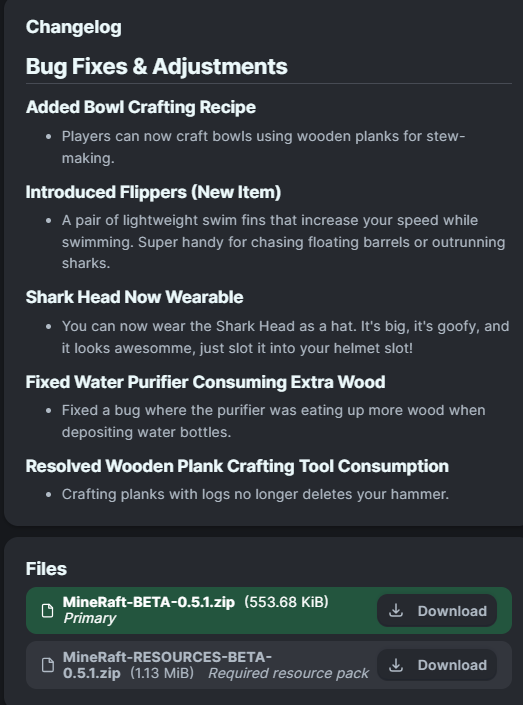
- Flippers for swimming speed
- Crafting materials: rope, nails, thatch, metal ore, refined scrap, trash cubes
Tech Structures
- Receiver with battery consumption and radar targeting
- Foundation counter (wall-mountable)
- Battery and circuit board system
Custom Mob: Steve the Shark
- Custom pathfinding and AI
- Raft circling behavior
- Water player targeting
- Raft structure attacks
- Storm aggression increases
- Trophy drops when defeated
Trophy & Combat System
- Trophy board for displaying shark heads
- Wearable shark head
- Shark repellant crafting
UI & Interface
- Crop plot UI with growth timers
- Collection net capacity display
- Water purifier UI
- Trading post level indicators
- Structure proximity UI elements (5 block range)
Admin & Management
- Interactive admin menu with item browsing
- Weather control toggles
- Stats management (reputation adjustment)
- Gameplay settings menu
- Credits and discord commands
Progression & Advancements
- Research guide system
- Custom advancement tree
- Recipe unlock based on progression
- Custom recipe book organization
Development Notes
This datapack is continually being updated with new features inspired by Raft. Future updates may include:
- Additional crafting recipes
- New raft mechanics/structures
- Recipe reworks that could disable outdated items
- Quests and storyline
Join the discord to report bugs and chat about future updates!!!
IMPORTANT READ DOWNLOAD INSTRUCTIONS BELOW!
How To Download
Data Pack:
- Click the latest Datapack version.
- Scroll down and Download the Primary file.
- If you want to create a World, go to Singleplayer > Create New World > Data Packs > Open Pack Folder. (It is not recommended to put it in an already existing world!)
- Copy/Cut and Paste the downloaded file there.
- Open/Create your world.
- Note: You need to also install the Required Resource Pack.
Required Resource Pack:
- Click the Datapack featured version.
- Scroll down and Download the Required Resource Pack.
- Open Minecraft and go to Options > Resource Packs > Open Pack Folder.
- Copy/Cut and Paste the downloaded file there.
- Activate the Resource Pack. (you can reload the resources with f3+t ingame)
See image below for reference